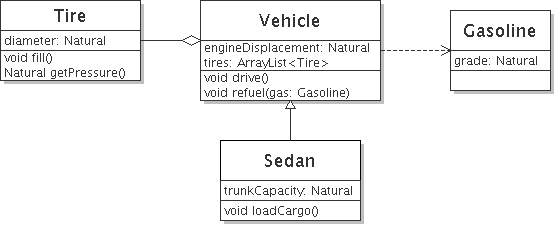
Slide
Lý thuyết
Tính đóng gói (Encapsulation) trong OOP C# là nguyên tắc: Ẩn dữ liệu bên trong đối tượng và chỉ cho phép truy cập thông qua các phương thức hợp lệ.
Nói đơn giản: Bạn khóa dữ liệu lại và chỉ mở những cánh cửa an toàn để người khác dùng.
Cách 1: Dùng private + phương thức public
class Person
{
    private int age;   // dữ liệu bị ẩn

    public void SetAge(int value)
    {
        if (value >= 0)
            age = value;
    }

    public int GetAge()
    {
        return age;
    }
}
Sử dụng trong hàm Main
Person p = new Person();
p.SetAge(20);     // OK
p.SetAge(-5);     // Không được gán
Cách 2 : Dùng Property
class Person
{
    private int age;

    public int Age
    {
        get { return age; }
        set
        {
            if (value >= 0)
                age = value;
        }
    }
}
Sử dụng thế nào ta?
Person p = new Person();
p.Age = 25;    // OK
p.Age = -10;   // Bị chặn
Bài tập
Bài tập 1. Class Student
Xây dựng class Student để biểu diễn các đối tượng sinh viên theo bản mô tả sau:
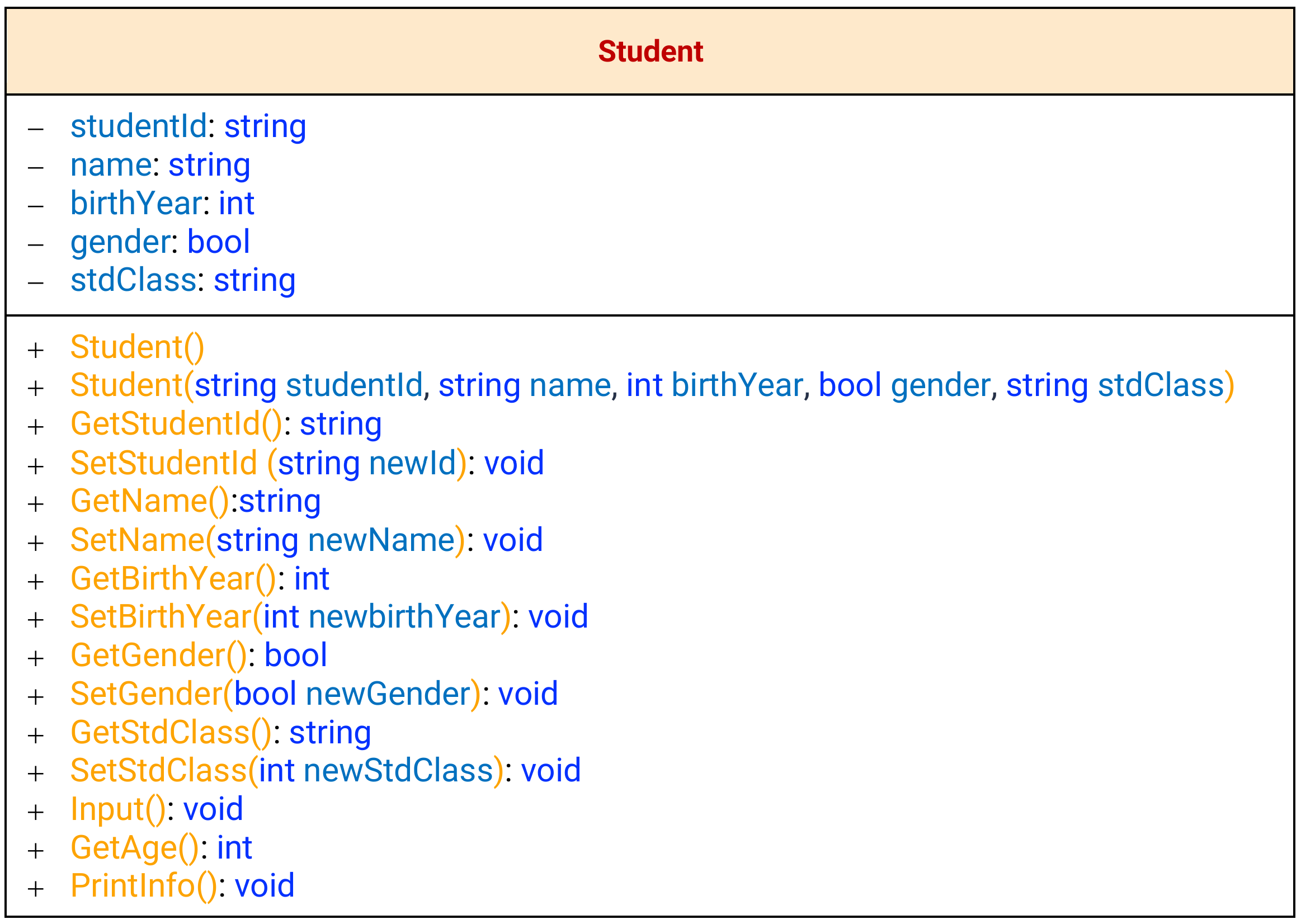
Mô tả
Attributes:
- studentId: string
- name: string
- birthYear: int
- gender: bool
- stdClass: string
§ Constructors:
- Default constructor tạo một sinh viên không có các thông tin ban đầu: Student()
- Khởi tạo một sinh viên với đầy đủ các thông tin ban đầu (birthYear cần được kiểm tra tính hợp lệ birthYear nằm trong khoảng 1900 đến năm hiện tại, nếu không hợp lệ thì thông báo và set vềgiá trị mặc định là 1900): Student(string studentId, string name, int birthYear, bool gender, string stdClass)
§ Methods:
- Các phương thức Get và Set để truy xuất và thiết lập giá trị cho các thuộc tính của sinh viên. Đối với phương thức Set thuộc tính năm sinh cần được kiểm tra tính hợp lệ birthYear lớn hơn/ bằng năm 1900 và nhỏ hơn/bằng năm hiện tại, nếu không hợp lệ thì thông báo và set về giá trị mặc định là 1900)
- Input(): Thực hiện nhập các thông tin cho sinh viên. Với năm sinh yêu cầu người dùng nhập cho đến thỏa điều kiện 1900 <= birthYear <= năm hiện tại.
- GetAge(): Trả về tuổi hiện tại của sinh viên.
- PrintInfo(): In ra tất cả thông tin của sinh viên:
Student ID: { studentId }
Name: { name }
Birth Year: { birthYear }
Gender: {Nam/Nữ}
Class: {stdClass}
Viết hàm Main để khởi tạo các đối tượng sinh viên và thực hiện các phương thức đã xây dựng.
namespace ViDu1
{
    internal class Program
    {
        static void Main(string[] args)
        {
            //vi du su dung thu
            Student thuytrang = new Student();
            Student thienbinh = new Student("25DH233424", "Bui Thien Binh", 1987, true, "PM2303");
            thuytrang.Input();//nhập thông tin từ bàn phím
            Student camloan = new Student("25DH233424", "Bui Thien Binh", 3500, true, "PM2303"); // in ra Invalid year (năm ko hợp lệ)
            string i = thienbinh.GetStudentId();
            thienbinh.SetStdClass("AI1245");
            int tuoi = thienbinh.GetAge(); //tra ve nam hien tai tru cho 1987
            thienbinh.PrintInfo(); //in ra toan bo thong tin
        }
    }
    public class Student
    {
        //thuoc tinh
        private string studentId;
        private string name;
        private int birthYear;
        private bool gender;
        private string stdClass;

        //constructor
        public Student() { }
        public Student(string studentId, string name, int birthYear, bool gender, string stdClass)
        {
            this.studentId = studentId;
            this.name = name;
            if (birthYear >= 1900 && birthYear <= DateTime.Now.Year)
                this.birthYear = birthYear;
            else
            {
                this.birthYear = 1900;
                Console.WriteLine("Invalid year;");
            }
            this.gender = gender;
            this.stdClass = stdClass;
        }
        public string GetStudentId()
        {
            return this.studentId;
        }
        public void SetStudentId(string newId)
        {
            this.studentId = newId;
        }
        public string GetName()
        {
            return this.name;
        }
        public void SetName(string newName)
        {
            this.name = newName;
        }
        public int GetBirthYear()
        {
            return this.birthYear;
        }
        public void SetBirthYear(int newBirthYear)
        {
            this.birthYear = newBirthYear;
        }
        public bool GetGender()
        {
            return this.gender;
        }
        public void SetGender(bool newGender)
        {
            this.gender = newGender;
        }
        public string GetStdClass()
        {
            return this.stdClass;
        }
        public void SetStdClass(string newStdClass)
        {
            this.stdClass = newStdClass;
        }

        public void Input()
        {
            Console.WriteLine("Input info of student");
            Console.Write("Input ID : ");
            this.studentId = Console.ReadLine();
            Console.Write("Input name : ");
            this.name = Console.ReadLine();
            Console.Write("Input birth year : ");
            int x;
            do
            {
                Console.Write("Input birth year 1900 - năm hiện tại : ");
                x = Int32.Parse(Console.ReadLine());
            }
            while (x <= 1900 || x >= DateTime.Now.Year);
            this.birthYear = x;
            Console.Write("Input gender (male 0 female 1 or others: ");
            if (Console.ReadLine() == "0")
                this.gender = false;
            else
                this.gender = true;
            Console.Write("Input class : ");
            this.stdClass = Console.ReadLine();
        }
        public int GetAge()
        {
            return DateTime.Now.Year - this.birthYear;
        }
        public void PrintInfo()
        {
            Console.WriteLine("Student ID:" + this.studentId);
            Console.WriteLine("Name:" + this.name);
            Console.WriteLine("Birth Year:" + this.birthYear);
            Console.WriteLine("Gender:" + this.gender);
            Console.WriteLine("Class:" + this.stdClass);
        }
    }
}
Bài tập 2. Class Fraction
Xây dựng class Fraction để biểu diễn phân số với các thuộc tính numerator (tử số) và denominator (mẫu số) nguyên.
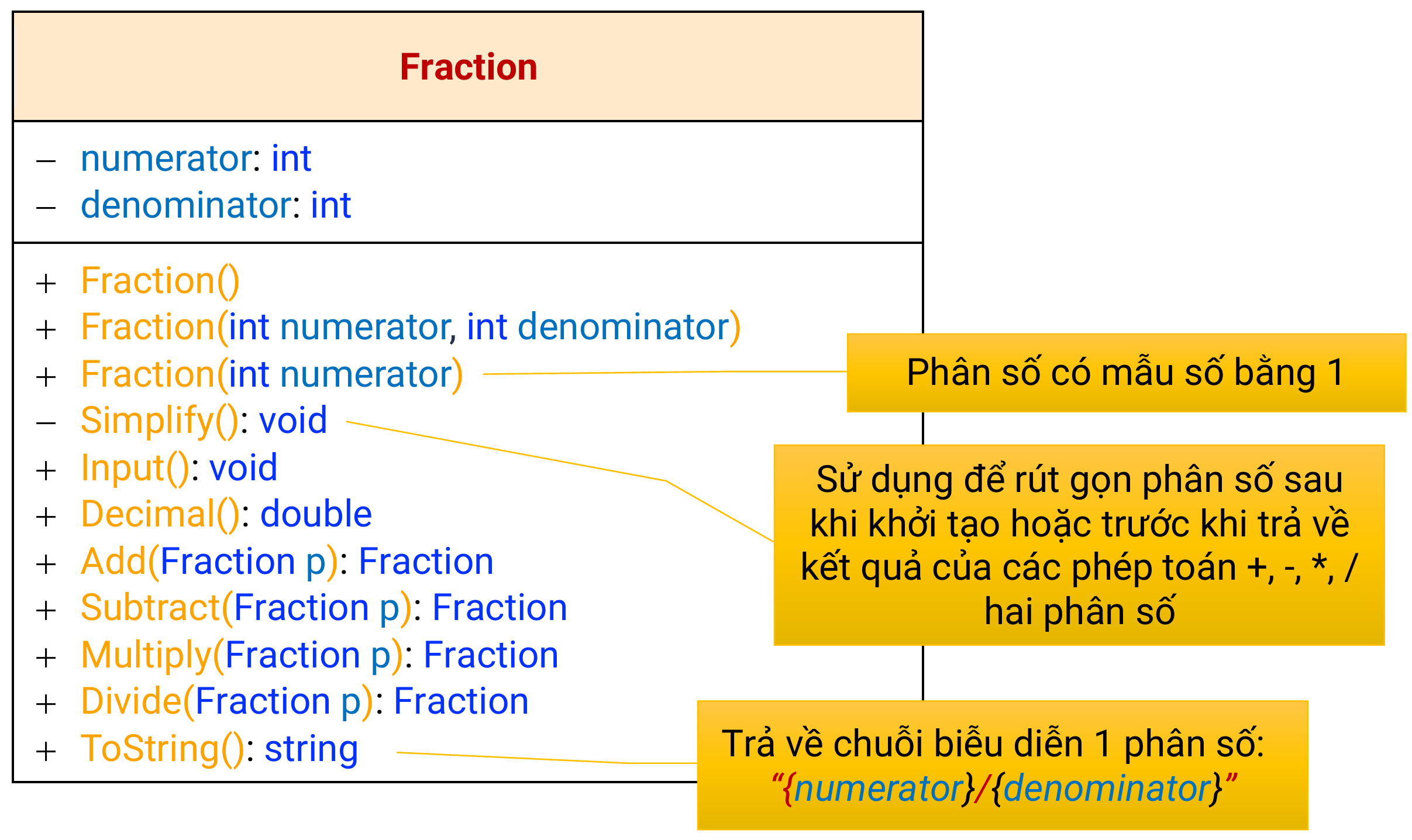
§ Attributes:
- numerator: int
- denominator: int
§ Properties:
- Numerator: bao gồm thao tác get truy xuất tử số và set để thiết lập giá trị cho tử số
- Denominator: bao gồm thao tác get truy xuất mẫu số và set để thiết lập giá trị cho mẫu
số (kiểm tra nếu giá trị mẫu số = 0 thì thông báo cho người dùng và set giá trị mặc định
cho mẫu số 1)
§ Constructors:
- Default constructor tạo phân số có tử số = 0, mẫu số =1: Fraction()
- Khởi tạo phân số với giá trị tử số và mẫu số cho trước (giá trị mẫu số được kiểm tra
như phía trên): Fraction(int numerator, int denominator) - Khởi tạo phân số với giá trị tử số cho trước, mẫu số = 1: Fraction(int numerator) Yêu cầu: Các phân số sau khi được khởi tạo đều phải được rút gọn
§ Methods:
- Simplify(): Tối giản phân số
- Input(): Thực hiện nhập tử số và mẫu số cho phân số. Với mẫu số yêu cầu người dùng nhập cho đến khi mẫu số khác 0. Phân số sau khi nhập xong sẽ được rút gọn.
- Decimal(): Trả về giá trị thập phân của phân số
- Add(Fraction p): Trả về một phân số là tổng của đối tượng phân số hiện hành với một phân số p. Phân số kết quả phải được rút gọn trước khi trả về.
- Subtract(Fraction p): Trả về một phân số là hiệu của đối tượng phân số hiện hành với một phân số p. Phân số kết quả phải được rút gọn trước khi trả về.
- Multiply(Fraction p): Trả về một phân số là tích của đối tượng phân số hiện hành với một phân số p. Phân số kết quả phải được rút gọn trước khi trả về.
- Divide(Fraction p): Trả về một phân số là thương của đối tượng phân số hiện hành với một phân số p. Phân số kết quả phải được rút gọn trước khi trả về.
- ToString(): Trả về chuỗi biểu diễn phân số dưới dạng: “numerator/denominator”
Viết hàm Main để khởi tạo các đối tượng phân số và thực hiện các phép toán trên các đối
tượng này.
namespace ViDu1
{
    internal class Program
    {
        static void Main(string[] args)
        {
            Fraction a = new Fraction(4, 5);
            Fraction b = new Fraction(8, 15);
            Fraction c = new Fraction(2, 4); //nhờ có hàm Simplify nên tự động rút gọn trở thành 1/2
            Fraction d = new Fraction(7); //có mẫu số bằng 1
            Fraction e = new Fraction();
            e.Input(); // nhập từ bàn phím
            Double x = c.Decimal(); // x = 0.5
            Fraction g = a.Multiply(b);
            Fraction h = a.Subtract(b);
            String y = b.ToString(); // y = "8/15"
        }
    }

    class Fraction
    {
        private int numerator;
        private int denominator;
        //Property
        public int Numerator
        {
            get { return numerator; }
            set { numerator = value; }
        }
        public int Denominator
        {
            get { return denominator; }
            set { denominator = value; }
        }
        public Fraction()
        {
            this.numerator = 0;
            this.denominator = 1;
        }

        public Fraction(int numerator, int denominator)
        {
            this.numerator = numerator;
            this.denominator = denominator;
            Simplify();
        }

        private void Simplify()
        {
            int uocsochunglonnhat = USCLN(this.numerator, this.denominator);
            this.numerator /= uocsochunglonnhat;
            this.denominator /= uocsochunglonnhat;
        }
        static int USCLN(int a, int b)
        {
            if (b == 0) return a;
            return USCLN(b, a % b);
        }

        public Fraction(int numerator)
        {
            this.numerator = numerator;
            this.denominator = 1;
        }
        public void Input()
        {
            Console.Write("Input numerator (Nhập tử số) : ");
            this.numerator = Int32.Parse(Console.ReadLine());
            int x;
            do
            {
                Console.Write("Inputdenominator (Nhập mẫu số) khác không 0: ");
                x = Int32.Parse(Console.ReadLine());
            }
            while (x == 0);
            Simplify();
        }

        public double Decimal()
        {
            return (this.numerator / this.denominator);
        }

        public Fraction Add(Fraction p)
        {
            Fraction result = new Fraction();
            result.numerator = this.numerator * p.denominator + this.denominator * p.numerator;
            result.denominator = this.denominator * p.denominator;
            result.Simplify();
            return result;
        }

        public Fraction Subtract(Fraction p)
        {
            Fraction result = new Fraction();
            result.numerator = this.numerator * p.denominator - this.denominator * p.numerator;
            result.denominator = this.denominator * p.denominator;
            result.Simplify();
            return result;
        }
        public Fraction Multiply(Fraction p)
        {
            Fraction result = new Fraction();
            result.numerator = this.numerator * p.numerator;
            result.denominator = this.denominator * p.denominator;
            result.Simplify();
            return result;
        }
        public Fraction Divide(Fraction p)
        {
            Fraction result = new Fraction();
            result.numerator = this.numerator * p.denominator;
            result.denominator = this.denominator * p.numerator;
            result.Simplify();
            return result;
        }
        override public string ToString()
        {
            return (this.numerator + "/" + this.denominator);
        }


    }
}
Bài tập 3. Class Rectangle
Xây dựng class Rectangle để biểu diễn các đối tượng hình chữ nhật theo bản mô tả sau: (Sinh viên suy nghĩa các ràng buộc và các thuộc tính/phương thức cần thiết để mô tả được đối tượng đúng với thực tế. Ví dụ: chiều dài, chiều rộng của hình chữ nhật phải lơn hơn 0)
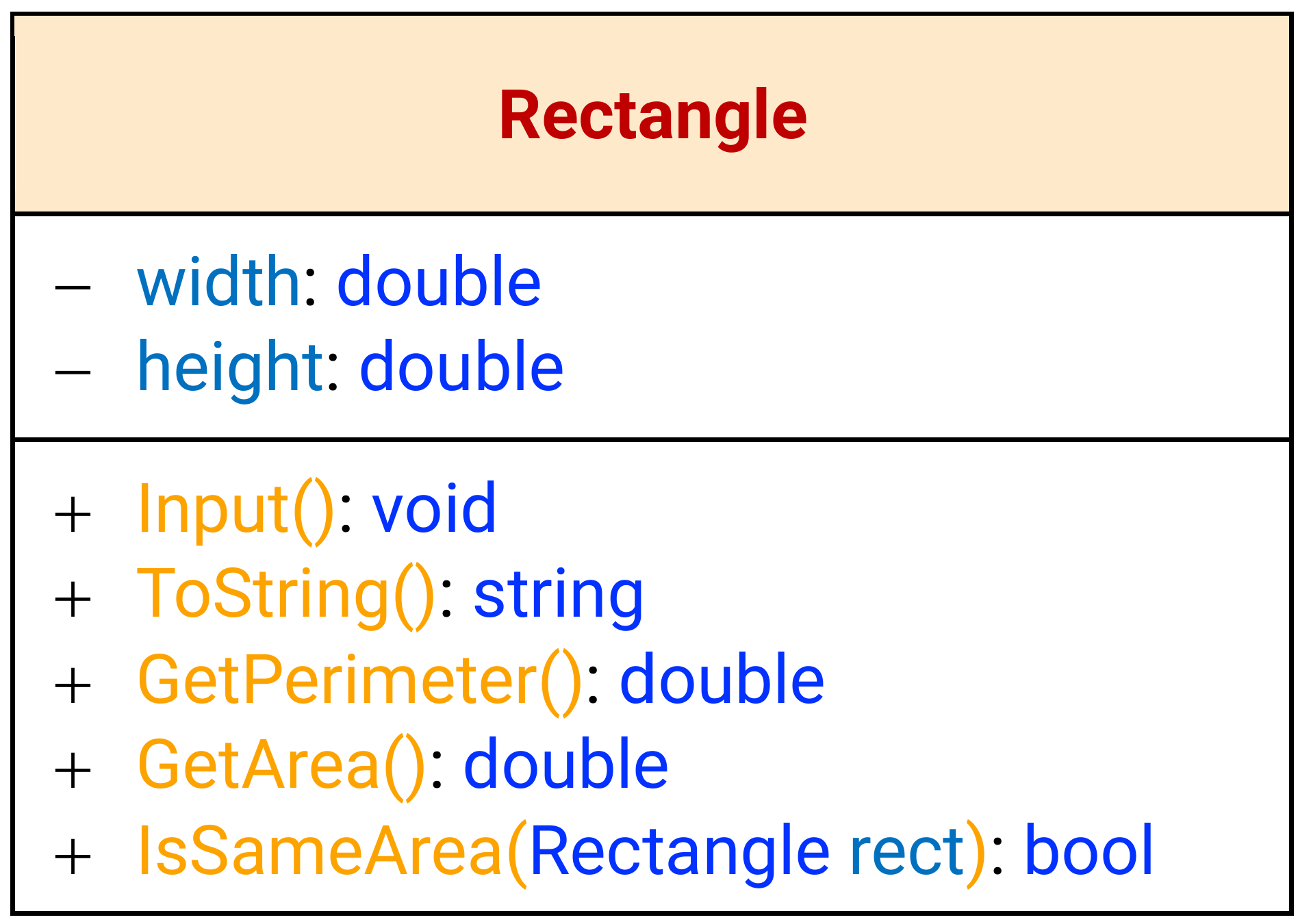
namespace ViDu1
{
    internal class Program
    {
        static void Main(string[] args)
        {
            Rectangle A = new Rectangle(7.5, 3);
            Rectangle B = new Rectangle(-8, 3); // In ra Chieu rong <=0 khong phu hop nen set ve 1, cuối cùng thì có kích thuớc 1 x 3
            Rectangle C = new Rectangle();
            C.Input();
            double n = A.GetArea(); //tính diện tích
            double cv = A.GetPerimeter(); //tính chu vi
            bool bb = A.IsSameArea(B); //trả về false vì diện tích A và B ko bằng nhau
        }
    }

    class Rectangle
    {
        //thuoc tinh
        private double width;
        private double height;

        //phuong thuc constructor
        public Rectangle() { }
        public Rectangle(double Width, double Height) // nếu dài hoặc rộng <=0 thì thiết lập về 1, nếu >0 thì bình thường
        {
            if (Width > 0)
                width = Width;
            else
            {
                width = 1;
                Console.WriteLine("Chieu rong <=0 khong phu hop nen set ve 1"); } if (Height > 0)
                height = Height;
            else
            {
                height = 1;
                Console.WriteLine("Chieu dai <=0 khong phu hop nen set ve 1"); } } public void Input() { do { Console.WriteLine("Nhập chiều rộng >0:");
                width = Int32.Parse(Console.ReadLine());
            }
            while (width < 0); do { Console.WriteLine("Nhập chiều dài: >0");
                height = Int32.Parse(Console.ReadLine());
            }
            while (height < 0);
        }
        public override String ToString()
        {
            String result = "Kích thước hình chữ nhật là" + width + "x" + height;
            return result;
        }
        public double GetPerimeter()
        {
            return (width + height) * 2;
        }
        public double GetArea()
        {
            return width * height;
        }
        public bool IsSameArea(Rectangle rect)
        {
            if (this.width * this.height == rect.width * rect.height)
                return true;
            else
                return false;
        }

    }
Để ý xem rằng trong đoạn code trên cô Trang không dùng 2 phương thức public kiểu như GetWidth và SetWidth cũng như không dùng Properties để lấy và thiết lập giá trị của width và height. Các em hãy thử viết 2 Properties có tên là Width và Height để hoàn thiện thêm bài làm nha.
Bài tập 4. Class Date
Xây dựng class Date để biểu diễn ngày tháng theo bản mô tả sau:
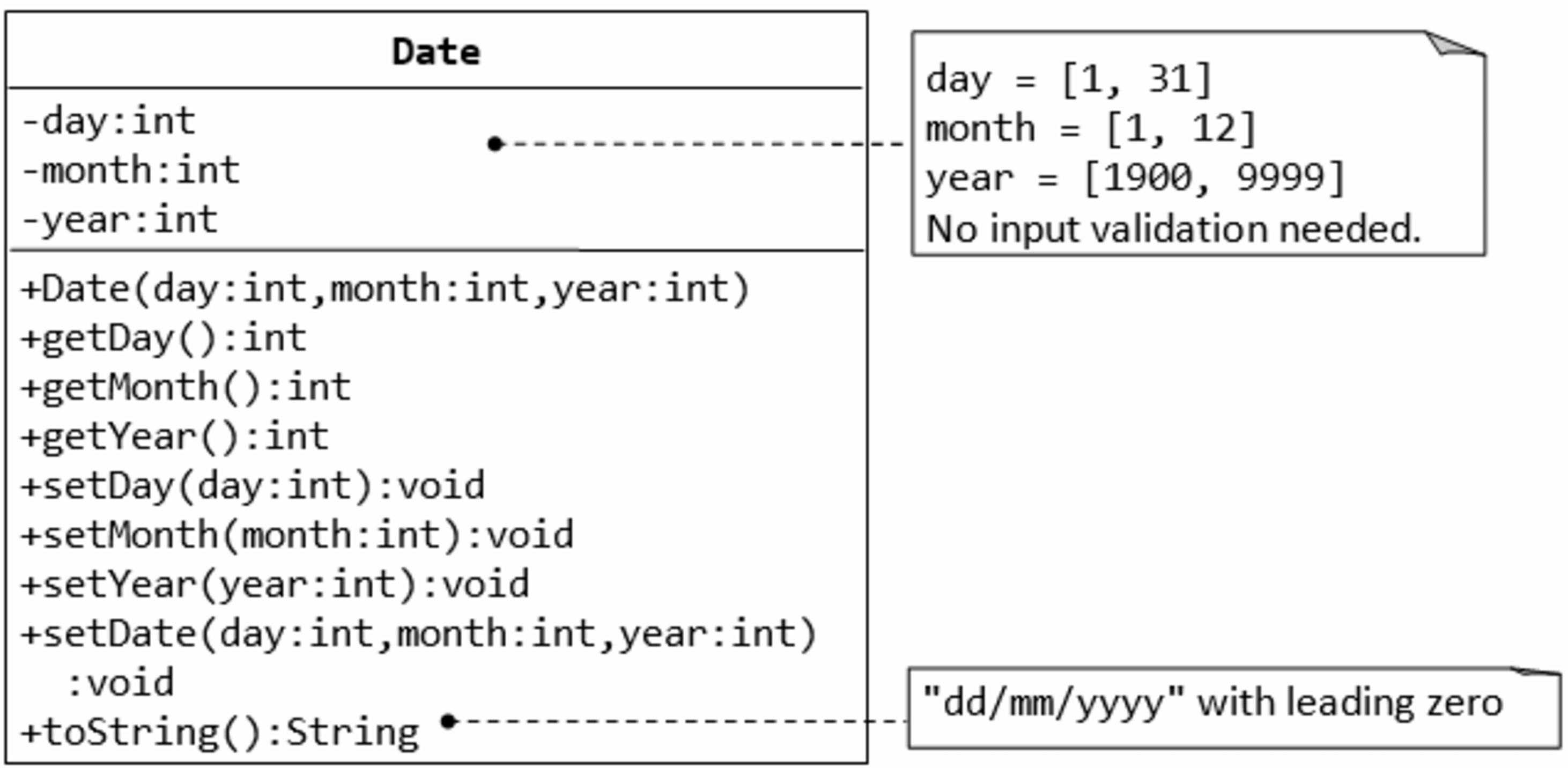
class Date
    {
        private int day;
        private int month;
        private int year;

        public Date(int day, int month, int year)
        {
            this.day = day;
            this.month = month;
            this.year = year;
        }

        public int getDay()
        {
            return day;
        }
        public int getMonth()
        {
            return month;
        }
        public  int getYear()
        {
            return year;
        }
        public void setDay(int day)
        {
            this.day = day;
        }
        public void setMonth(int month)
        {
            this.month = month;
        }
        public void setYear(int year)
        {
            this.year = year;
        }

        public void setDate(int day, int month, int year)
        {
            this.day = day;
            this.month = month;
            this.year = year;
        }
        public override string ToString()
        {
            return String.Format("{0:00}", this.day) + "/" + String.Format("{0:00}", this.month) + "/" + String.Format("{0:00}", this.year);
        }
    }
Bài tập 5. Class Book
Xây dựng class Author để biểu diễn tác giả và class Book để biểu diễn quyển sách theo mô tả
sau:
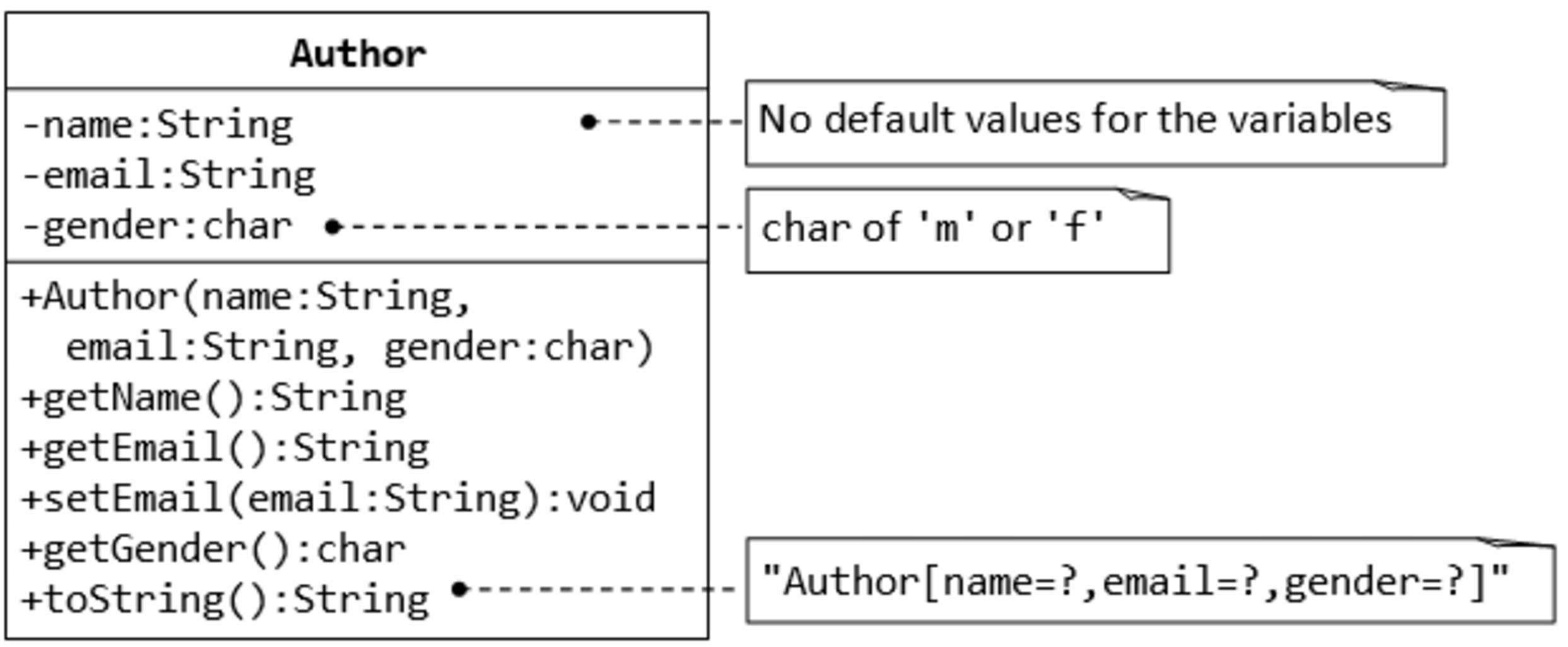
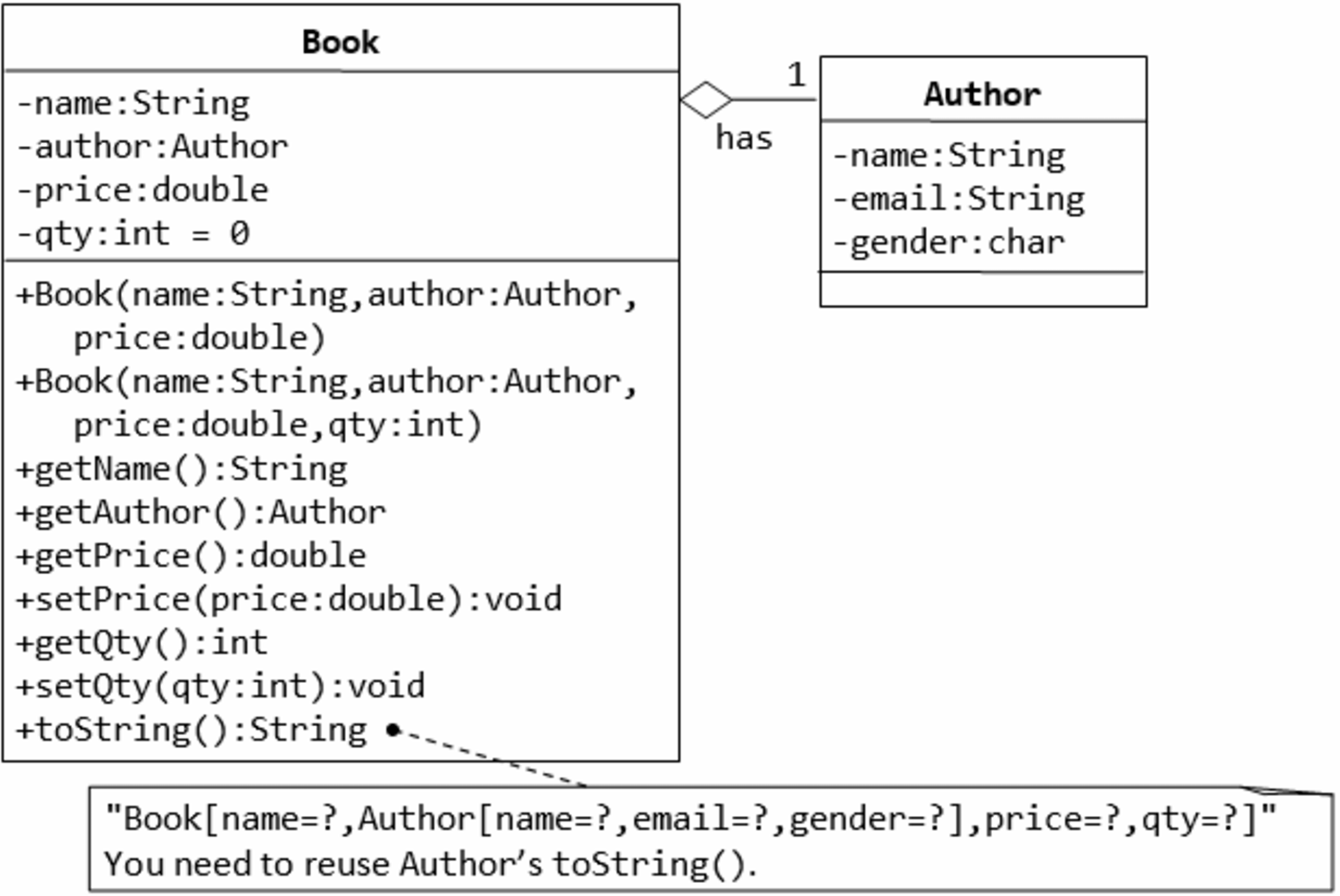
Bài tập 6
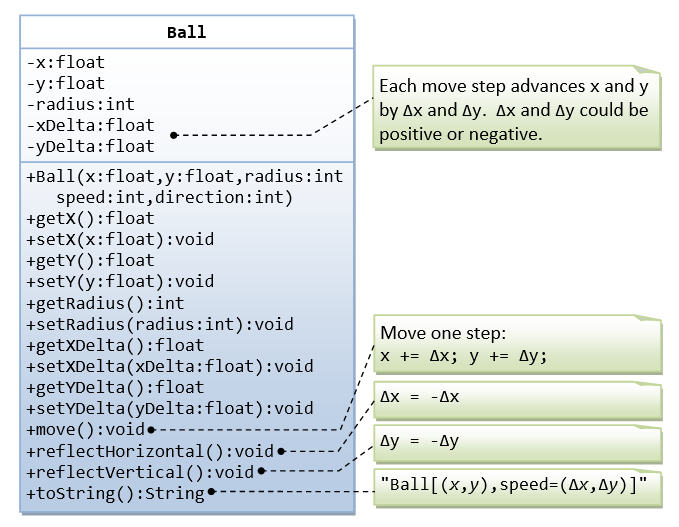
Bài tập 7
Bài 8
Bài 9
Bài 10
Bài 11